How to use Sphinx to document#
If you want to know how the following features are implemented, you can just click Page source below in the footer to see the source markdown file. For any questions and comments, please leave them in the comment box at the end.
Console#
$ mkdir doc-example
$ cd doc-example
$ sphinx-quickstart
You probably noticed that there’s a handy Copy button when you hover around the block.
To enable this feature, you need pip install sphinx-copybutton, then enable it in conf.py
by adding to the extension list.
extensions = [
    # ... your other extensions ...
    "sphinx_copybutton",
]
Latex equation#
Make sure the conf.py file has this setting, which will auto-number the equations.
extensions = [
    "myst_parser",
]

myst_enable_extensions = [
    "amsmath",
    "dollarmath",
]

math_number_all = True
This is inline math \(E=mc^2\), and here is a separated one as shown in equation (1).
You can also use an inline dollar symbol to write an equation like this \(a^2 + b^2 = c^2\), or separated equations like this.
Equation (2) excited Newton for two reasons. First, they could be used to speed up calculations enormously, and second, they were relevant to a controversial problem in music theory ha was working on: how to divide an octave into perfectly equal musical steps without sacrificing the most pleasing harmonies of the traditional scale [1].
Image with caption#
We can use the following way to add an image with a caption. The grammar is different from the common Markdown format. With numfig = True in conf.py, figures will be automatically numbered across all documents in the toctree (not per-document), and you can reference them using {numref}.
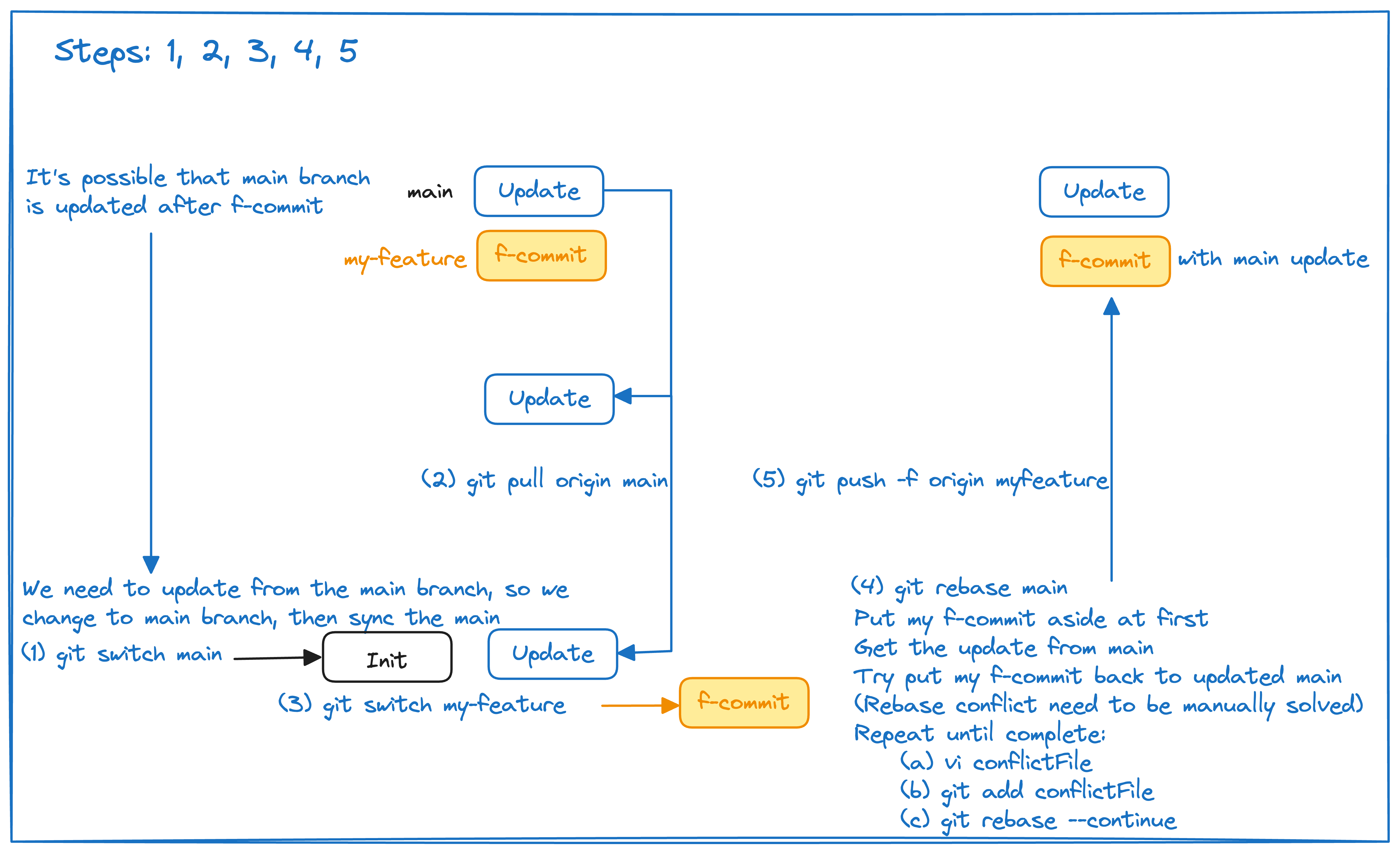
Fig. 1 This is a test to add an image with a caption.#
As shown in Fig. 1, the figure is automatically numbered. Note that Sphinx numbers figures
continuously across all documents in your documentation (like chapters in a book), so this might not be
Figure 1 if there are figures in earlier documents. To reset the figure number for each page, I created
an extension doc/_extensions/per_page_numfig.py, which can be found here.
If you enable it in conf.py like extensions = ['_extensions.per_page_numfig'], the figure numbers for
all the figures would be correct.
Information box#
Note
This is a note.
Tip
This is a tip.
Warning
This is a warning.
Dropdown box
此开卷第一回也。作者自云:曾历过一番梦幻之后,故将真事隐去,而借 通灵说此《石头记》一书也,故曰“甄士隐”云云。但书中所记何事何人?自己又 云:“今风尘碌碌,一事无成,忽念及当日所有之女子:一一细考较去,觉其行止 见识皆出我之上。我堂堂须眉诚不若彼裙钗,我实愧则有馀,悔又无益,大无可如 何之日也。当此日,欲将已往所赖天恩祖德,锦衣纨之时,饫甘餍肥之日,背父 兄教育之恩,负师友规训之德,以致今日一技无成、半生潦倒之罪,编述一集,以 告天下;知我之负罪固多,然闺阁中历历有人,万不可因我之不肖,自护己短,一 并使其泯灭也。所以蓬牖茅椽,绳床瓦灶,并不足妨我襟怀;况那晨风夕月,阶柳 庭花,更觉得润人笔墨。我虽不学无文,又何妨用假语村言敷演出来?亦可使闺阁 昭传。复可破一时之闷,醒同人之目,不亦宜乎?”故曰“贾雨村”云云。更于篇 中间用“梦”“幻”等字,却是此书本旨,兼寓提醒阅者之意。
To enable dropdown box, we need to pip install sphinx-design and set conf.py as:
extensions = [
    'sphinx_design', # To show dropdown box
]
Format#
Sometimes we want to strikethrough text. We can enable this feature by adding
myst_enable_extensions = [
    ...,
    "strikethrough",
]
You can also highlight some text by using <mark>important text</mark>.
Citation#
You can cite other papers easily. For example, I published my first research paper in 2020, which uses a neural network to fit a function of the structure factor of polymer systems [2]. To achieve this feature, you need to install the BibTeX support through
pip install sphinxcontrib-bibtex
and then make sure
conf.py has the following lines.
extensions = [
    # ...
    'sphinxcontrib.bibtex'
    ]
bibtex_bibfiles = ["ref.bib"]
Molecular visualisation#
To visualise molecular structures, I created sphinx-molview. You can
install it by using pip install git+https://github.com/HuangJiaLian/sphinx-molview.git and enable it conf.py by adding it to the list of extensions:
extensions = [
    # ...
    'sphinx_molview',
    ]
This plugin supports .xyz and POSCAR format at this moment. For clathrate
hydrates it can also detect the water cages automatically. The Show cage
controls above the viewer toggle the small and large cages independently, and
the adjacent colour pickers update their transparent tiles. The display menu
switches between tiles with edges, edges only, and tiles only. The cage edit
menu lets you click to hide individual faces or edges; Reset cage restores
them without changing the molecular structure.
The same sII template can complete the cage outlines at a terminated surface. The reconstructed vertices and faces are visual guides only; they are not added to the atomic structure.
References#
Steven H. Strogatz. Infinite Powers: How Calculus Reveals the Secrets of the Universe. Houghton Mifflin Harcourt, Boston, 2019. ISBN 978-1328879981.
Jie Huang, Shiben Li, Xinghua Zhang, and Gang Huang. Neural network model for structure factor of polymer systems. The Journal of Chemical Physics, September 2020. URL: http://dx.doi.org/10.1063/5.0022464, doi:10.1063/5.0022464.