Type Finnish and Special Characters using a US Keyboard#
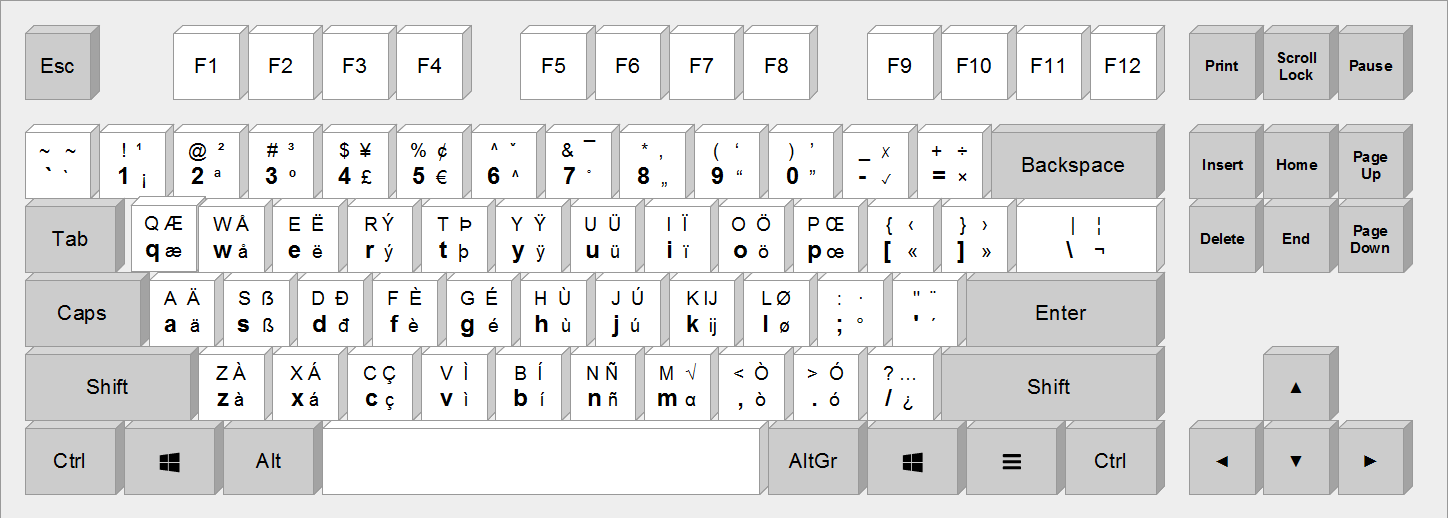
Fig. 1 The European Keyboard Layout [1]. To type ä, you use altgr + a; to type Ä, you use altgr + shift + a.#
Before buying a Finnish keyboard, I asked AI whether there was an alternative that could save me the cost of buying a new keyboard. That is how I learned about EurKey, which lets me type Finnish characters very easily.
In Linux Mint, enable it by:
setxkbmap eu
You can type the Finnish characters äåö with AltGr + a, w, and o, and
use AltGr + Shift + a, w, and o to get the capital letters ÄÅÖ.
Summary#
Thanks to the author of EurKey, Steffen. He created something genuinely useful that makes my life easier.
References#
Steffen Brüntjen. Eurkey the european keyboard layout: download. https://eurkey.steffen.bruentjen.eu/download.html, 2026. EurKEY Manual. Accessed: 2026-05-06.